
Choose which emails your team gets
Route account notifications to specific team members, pick per-event or daily digest, and switch off the built-in fundraiser emails.
Donately does not email your admins about every donation by default. On a busy account that would be unusable, so the account events are silent until someone opts in. This page is where you opt in, and where you decide who gets what.
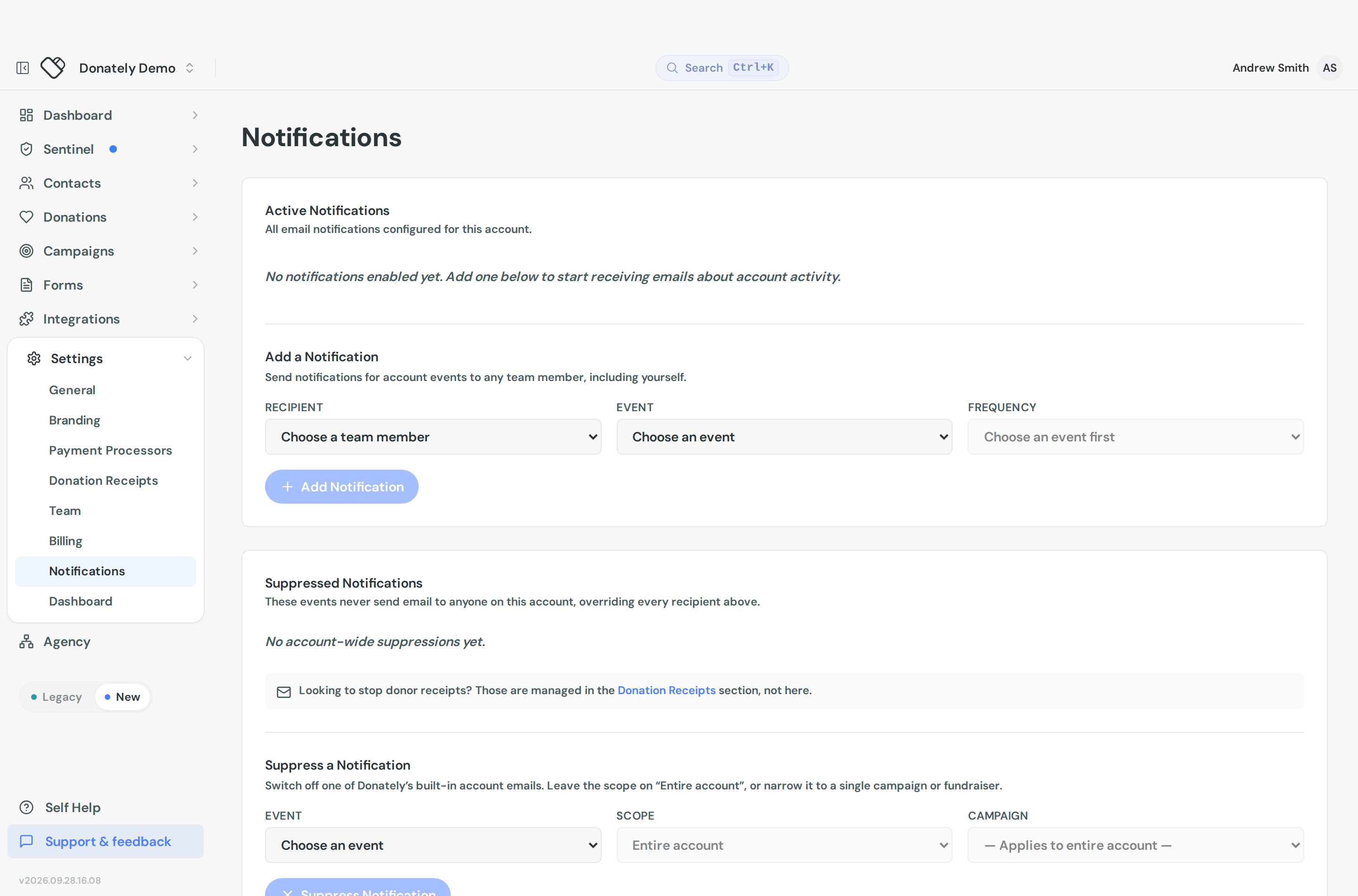
Go to Settings, then Notifications.
Add a notification
Under Active Notifications you will find Add a Notification. Pick three things:
- Recipient, a team member on the account. You can only route to someone who already has access, so add them first if they are not there. See Team members.
- Event, from the list below.
- Frequency, which depends on the event.
Then select Add Notification. The table above shows every notification that is live, with its recipient, event and frequency, and a Remove on each row.
There is no edit in place. To change who receives something, remove the row and add a new one.
The events
| Event | Frequency options | By default |
|---|---|---|
| Donation processed | Every event, or Daily digest | Silent, admins opt in |
| Recurring donation failed | Daily digest only | Silent, admins opt in |
| Recurring donation updated | Daily digest | Silent, admins opt in |
| Integration run failure | Every event | Silent, admins opt in |
| Integration run warning | Daily digest | Silent, admins opt in |
| Fundraiser created | Daily digest for admins, or suppress | Emails the fundraiser creator |
| Fundraiser donation created | Suppress only | Emails the fundraiser creator |
Two things worth noticing.
Donation processed is the only one you can get per donation. Choose Every event for an email on each gift, or Daily digest for one summary a day. If a digest is too coarse and per-donation is too noisy, build something conditional with Zapier instead, for example only gifts over a certain amount.
Failed recurring donations are digest only. There is no instant alert for them. See Recurring plan statuses.
This is available on every plan. Older help articles said digests were limited to Team and Enterprise, and that is no longer the case.
Turn off the built-in fundraiser emails
The two fundraiser events behave differently from the rest. Donately already emails the person who created a fundraising page when their page is made and when it receives a gift, without anyone opting in. Supporters generally want those.
If you do not, use Suppressed Notifications, then Suppress a Notification. Pick the event and a Scope:
- Entire account switches it off everywhere.
- Specific campaign or Specific fundraiser switches it off for just that one.
A suppression beats everything. It stops that email to everyone on the account, overriding any recipient you set up above.
Who sees what
Owners and admins see every notification on the account and can add or remove them for anyone.
Everyone else, including finance and support roles, sees only their own rows and can only add notifications for themselves.
Each person can also review their own across every Donately account they belong to: open User Settings, then the Notifications tab. That view is remove-only, so you add from an account's settings and can unsubscribe yourself from anywhere.
Related emails managed elsewhere
Donor receipts are not here. The email a donor gets after giving is a receipt, not a notification, and it is under Settings then Donation Receipts. See Donation receipts.
Integration sync alerts point here. The Get these events by email card on an integration links to this page. The two events behind it are Integration run failure and Integration run warning.
Failed payment emails to donors are sent by Stripe, not Donately, and are switched on in your Stripe dashboard. See Recurring plan statuses.