
Send account events to your own endpoint with webhooks
Create a webhook, the seven events you can subscribe to, and how to read the delivery log and resend a payload.
A webhook posts an event to a URL you control, in real time, as things happen in your account. It is the right tool when you want to react to a donation in your own system and the app you want to reach is not covered by a native integration or by Zapier.
You need somewhere to receive the request: an endpoint on your own server, or a service that accepts an inbound POST.
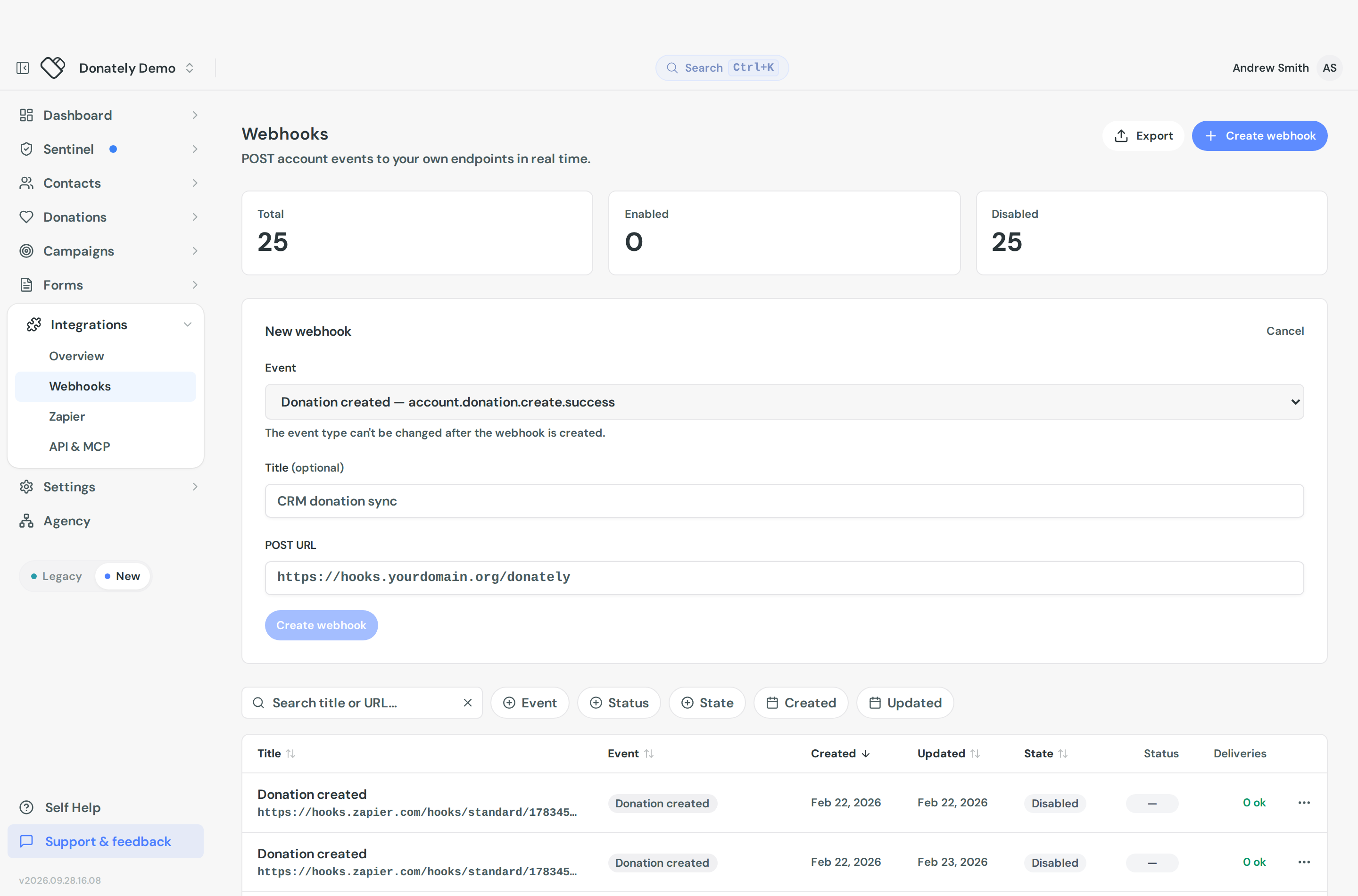
Create a webhook
- Go to Integrations, then Webhooks.
- Select Create webhook.
- Choose the Event. This is the one thing you cannot change later, so pick carefully.
- Give it a Title, which is optional but makes the list readable. Something like "CRM donation sync" beats seven rows all called "Donation created".
- Enter the POST URL, which must be a full URL starting with
https://. - Select Create webhook.
New webhooks are enabled straight away.
The events
There are seven, and a webhook subscribes to exactly one. To listen for several, create several webhooks pointing at the same URL.
| Event | Fires when |
|---|---|
| Donation created | A donation is recorded, online or offline |
| Donation updated | An existing donation changes, for example a refund or an edit |
| Campaign created | A campaign is created |
| Fundraiser created | A supporter's fundraising page is created |
| Recurring donation failed | A scheduled charge on a recurring plan fails |
| Recurring plan updated | A recurring plan changes, including cancellation |
| Donor information updated | A contact's personal details change |
The underlying event names, which is what you will see in the payload, follow the pattern account.donation.create.success. The dropdown shows both the friendly label and the raw name.
Read the delivery log
Open a webhook to see its Delivery log, with a count of how many events were delivered and how many failed.
Each row shows the HTTP status your endpoint returned, when it was created, the delivery id, and a retry count. Expand a row for the first and last attempt times, the total attempts, the POST URL, and the full JSON Payload that was sent. That payload view is the fastest way to work out why your own code rejected something.
A Delivery metrics card on the same page summarises the last attempt and the running totals of successful and failed deliveries.
Resend a payload
Expand a delivery and select Resend payload. Donately warns you that this re-queues that delivery and may create duplicates in your external system, which is worth taking seriously if your endpoint is not idempotent.
There is no "send a test event" button. To exercise a new endpoint, record a small test donation and let the real event fire, then resend that payload as often as you need while you debug. See Create a test donation.
Pause, edit and delete
Disable on the webhook's page pauses deliveries while keeping the configuration, and Enable turns it back on. You can also do this from the row menu in the list.
Edit lets you change the title, the POST URL and the enabled state. The event stays fixed.
Delete is in the Danger zone at the bottom of the webhook's page, and in the row menu in the list. It stops all deliveries immediately and cannot be undone.
Finding a webhook
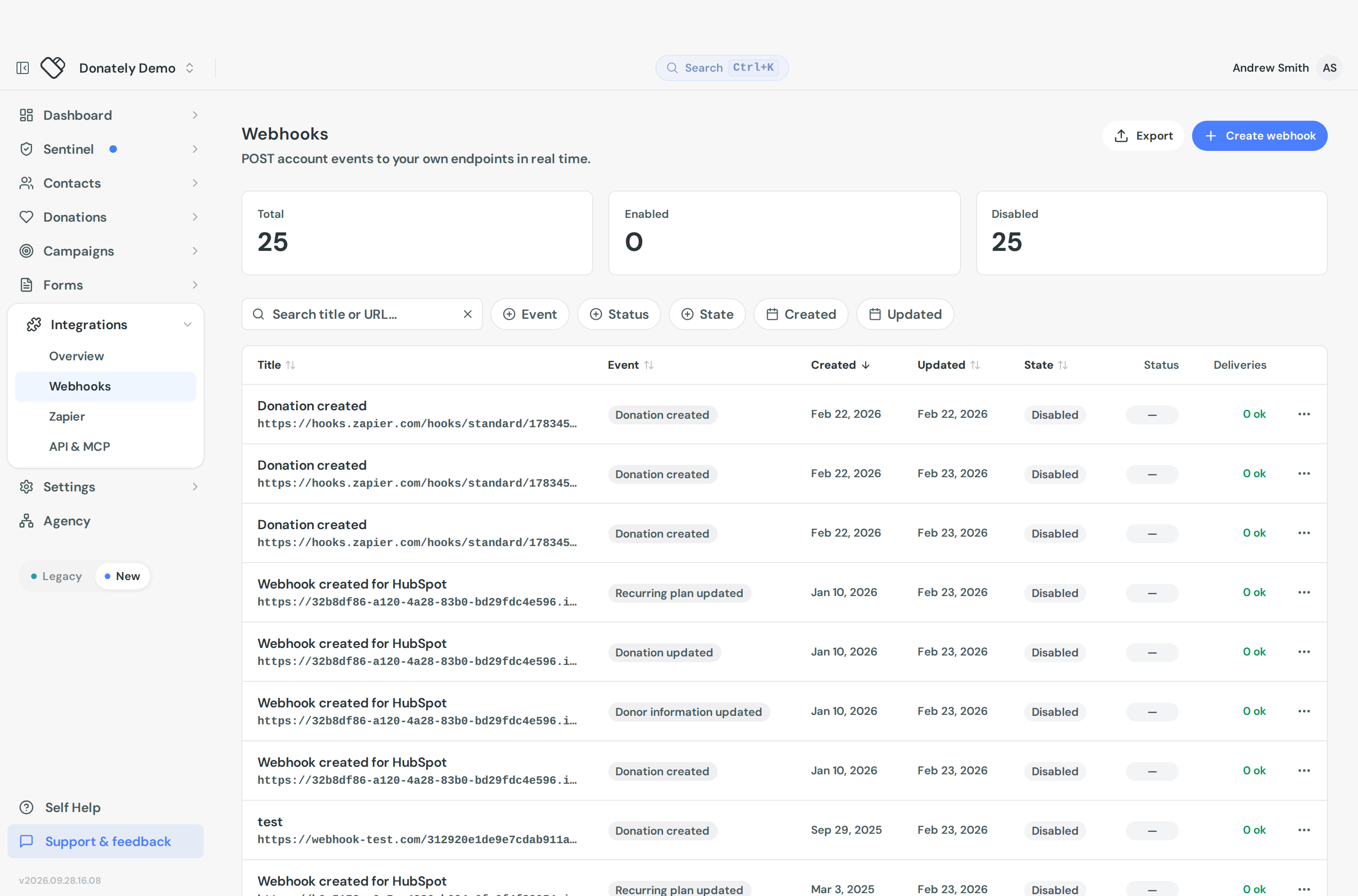
The list has a search box for the title or URL, and filters for Event, Status, State and the created or updated dates. Summary tiles at the top show your Total, Enabled and Disabled counts. Export gives you a CSV of every webhook with its delivery counts and last status.
What Donately does not surface
There is no signing secret. Donately does not currently expose a shared secret or signature header for verifying that a request really came from us. If your endpoint needs to be protected, put the check in your own URL, for example a long unguessable path segment or a query token, and reject anything else.
Retry behaviour is not documented in the dashboard. You can see how many attempts a delivery took, but the schedule behind that is not shown. Do not build logic that depends on a particular retry cadence.
Webhooks are never disabled automatically. A failing endpoint keeps being retried and stays enabled until you turn it off, so check the delivery log if you change or retire an endpoint.
For payload shapes and field reference, see the API documentation.