
What donors see after they give
Show a thank-you message, redirect to your own page, control the share buttons, and pass donation details to your landing page.
The moment after someone gives is the one time you have their full attention. Open the form and go to the After Donation section to decide what happens.
After submit offers three choices.
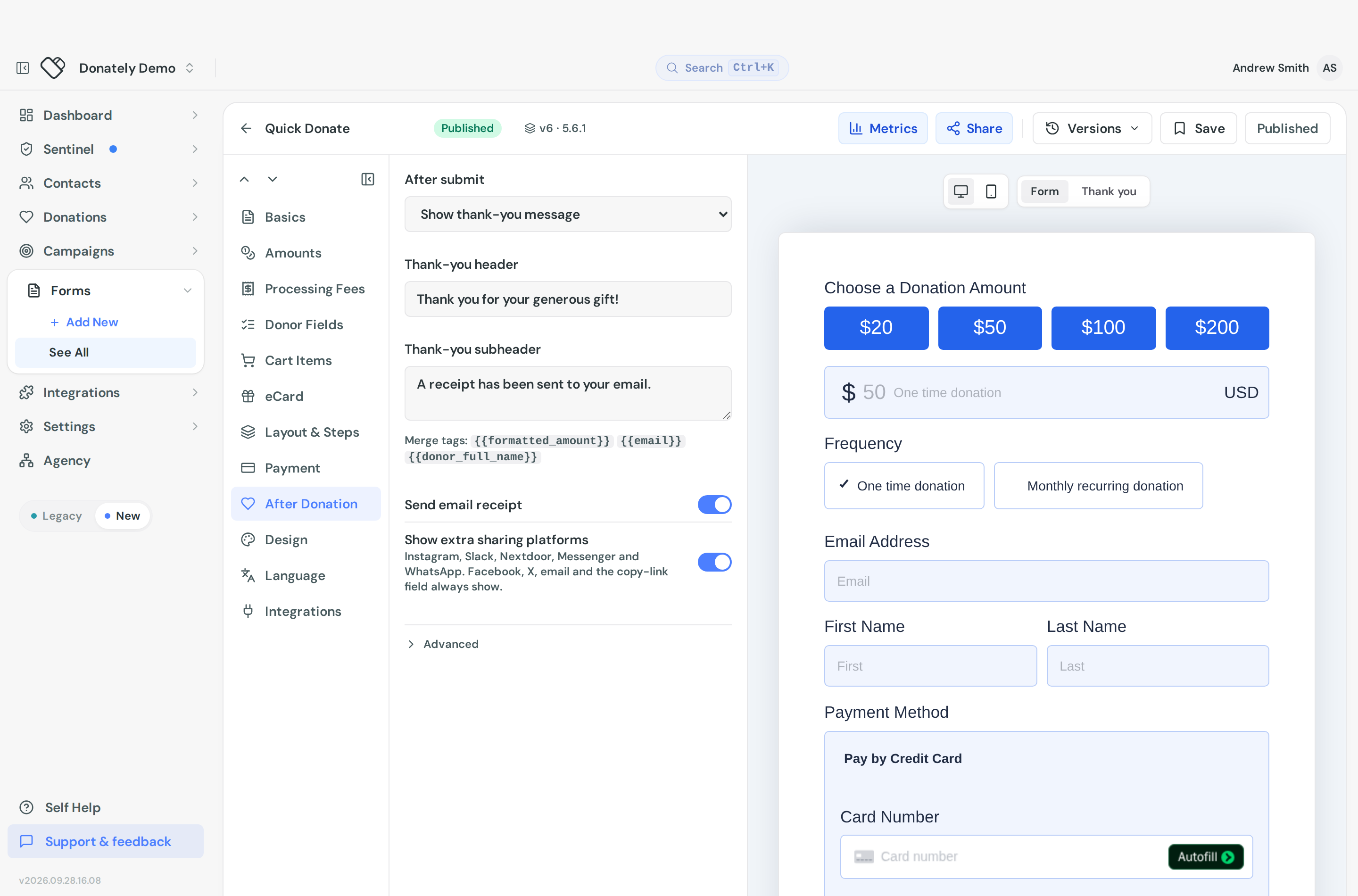
Show thank-you message
The default, and the right answer for most forms. Donately shows a confirmation on the form itself.
Thank-you header is the headline. Thank-you subheader is the line under it, and it accepts merge tags: {{formatted_amount}}, {{email}} and {{donor_full_name}}. Its default is "A receipt has been sent to your email."
You can preview it: the builder gains a Thank you tab next to the step tabs when this option is selected.
Redirect to URL
Sends the donor to a page on your own site instead.
Redirect URL must be https. Worth being deliberate here: a custom thank-you page lets you tell a story, offer a next step, or fire your own conversion tracking, but you take on the job of confirming the gift, and donors lose the built-in share buttons.
Append donation details to the URL adds an encoded ?payload= parameter carrying the amount, email, donation id and more, which your landing page can read and use to personalise itself or report a conversion.
None, stay on the form
The form stays put. Use this only when something else on your page handles the confirmation, otherwise the donor is left wondering whether it worked.
Receipts
Send email receipt sits in the same section and is on by default. Turning it off means donors get no email confirmation from Donately at all, and the section warns you about that.
The two settings are linked in a small helpful way: turning receipts off clears the default "A receipt has been sent to your email." subheader so you are not promising an email that never arrives. Turning them back on restores it. Wording you wrote yourself is never touched.
The receipt's content is not set here. That is account-wide, under Settings then Donation Receipts. See Donation receipts.
Share buttons
A toggle controls the sharing options on the thank-you screen. On some forms it controls the whole set, on others it adds extra platforms on top of the ones always shown, and the toggle's own description tells you which applies to yours.
When you are showing a thank-you message, Advanced gives you three more:
- Share message, the text prefilled when someone shares. It takes the
{{social_share_account_title}}merge tag. - Share URL, which defaults to the form's own page. Point it at a campaign page if that is the better landing spot.
- Twitter / X hashtags, comma separated, without the
#.
Use the Thank you preview tab to see the result.
What is not here
There is no upsell to monthly giving. Donately does not offer a "make this monthly" prompt after a one-time gift. If you want to push recurring, do it before the gift by putting monthly first in your frequency list. See Set the giving frequencies your form offers.
Other confirmation wording, such as the receipt line and the share prompts, is reworded under Appearance, on the Language tab. See Reword any text on your donation form.