
Choose a campaign type
The four campaign types in Donately, what each one gives you, and why the type is fixed once the campaign exists.
Every campaign has a type, and the type decides two things: whether Donately hosts a public page for it, and whether supporters can raise money on your behalf. You pick the type when you create the campaign, by choosing a page template, and it cannot be changed afterwards.
The four types
General. A hosted campaign page with your own cover image, content and donation form. Gifts given through it are earmarked to the campaign automatically. This is the right choice when you want a landing page for one cause or appeal.
Peer-to-Peer. A hosted campaign page whose main call to action invites supporters to start their own fundraising page. A gift made on the campaign page counts to the campaign; a gift made on a supporter's page counts to both that supporter and the campaign.
Peer-to-Peer with Teams. Peer-to-peer, plus the ability for supporters to fundraise as a team with a shared goal. See Team fundraisers.
Earmark. No hosted page at all. You embed a donation form on your own website and the campaign exists purely so those gifts roll up for reporting. This is what used to be called an Embeddable Form-Only campaign or an Earmark-Only campaign.
One naming quirk to expect: a General campaign is labelled General in the campaigns list and its filters, but Standard in the campaign builder's Settings section. They are the same type.
Create a campaign
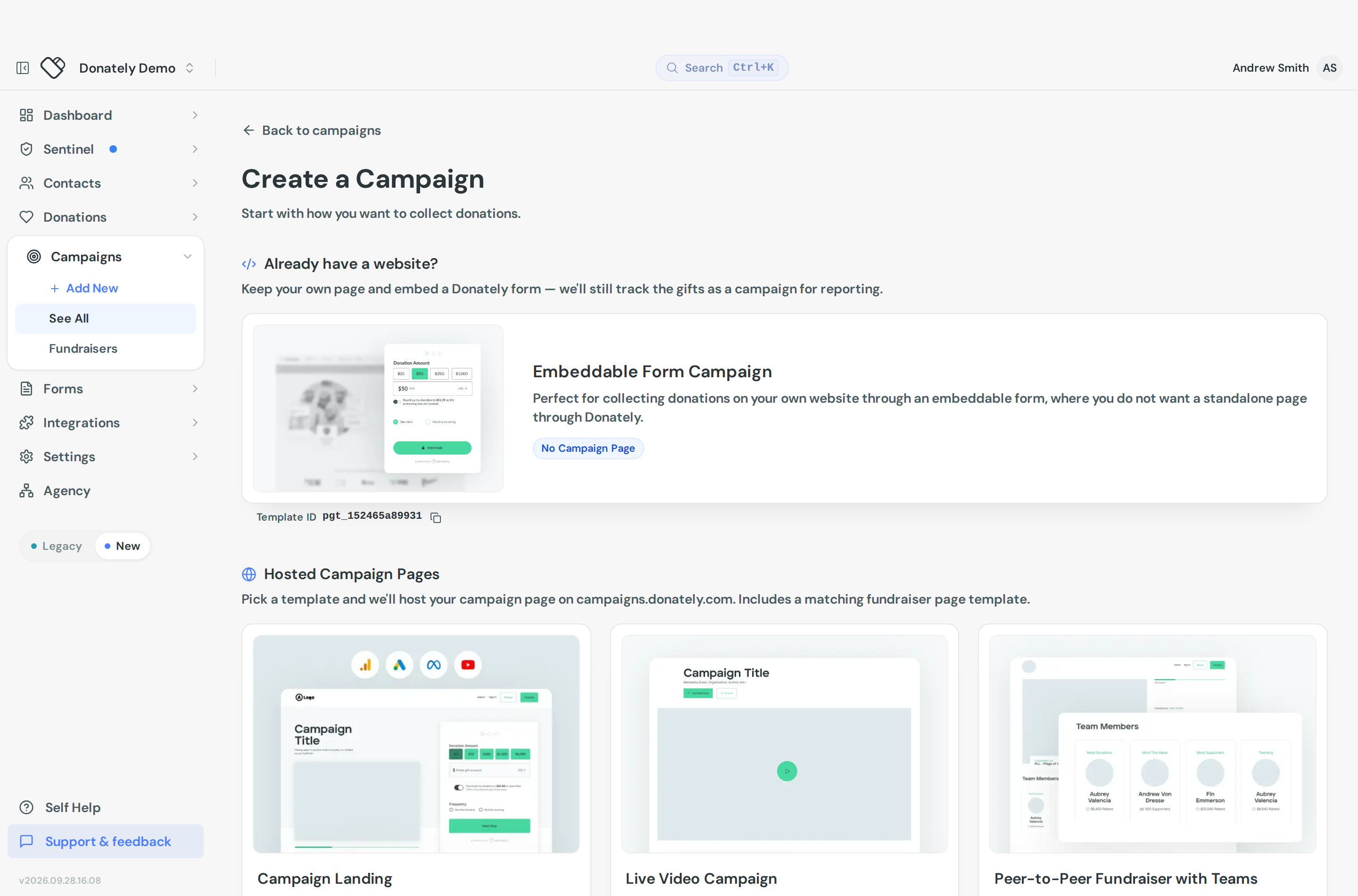
Go to Campaigns and use New Campaign. The Create a Campaign screen asks you to start with how you want to collect donations, and splits the templates into two groups:
- Already have a website? offers the earmark template, described as keeping your own page and embedding a Donately form while still tracking the gifts as a campaign.
- Hosted Campaign Pages offers the templates Donately hosts for you. Each one includes a matching fundraiser page template, so peer-to-peer supporter pages inherit the same look.
Pick a template, then Continue, which opens the campaign builder. The builder has four sections: Content, Design, Donation Form and Settings.
Earmark campaigns
An earmark campaign has no public Donately page, so a few things work differently.
The title is for you, not for donors. It never appears publicly. Give it a name you will recognise when filtering the donations list or reading an export.
A goal is optional. Nothing displays it unless you embed a progress bar on your own site. See Embeddable progress bar.
Link it to a form. The point of the campaign is to earmark gifts from a form you embed. Build or pick the form in the builder's Donation Form section, then embed that form on your site. See Put your donation form on your website.
Peer-to-peer is not available. Supporters cannot fundraise for an earmark campaign, because there is no page for them to start from.
Because there is no hosted page, admindash points the sharing tools at the form instead. The campaign's Share tab shows Donation Form URL rather than a campaign page link, and says that gifts made there count toward the campaign. View live page is hidden for earmark campaigns in the campaigns list, and the builder's preview pane says live preview is not available for them.
If a form already uses a campaign selector field, do not also earmark a single campaign to it. Add the new campaign to that selector's options instead, or build a separate form.
The type is fixed after creation
Open the campaign builder and go to Settings. Campaign Type is there, but it is read-only, with the note that it is set by the page template you chose when creating the campaign. There is no way to switch a campaign from General to Peer-to-Peer, or to give an earmark campaign a hosted page, after the fact.
If you picked the wrong one, use Duplicate from the campaigns list to start again from the right template, then archive the original. Your existing donations stay attached to the original campaign, so do this before the campaign starts taking gifts if you can.
Where the type shows up later
The campaigns list has a Campaign Type column, a Template column, and a Type filter with General, Peer-to-peer, P2P with teams and Earmark. The campaign detail page shows the type in its summary as well.
If you import campaigns from a CSV, the campaign_type column accepts general, earmark, p2p_fundraisers or p2p_teams.