
Export your data to CSV
Download the rows on screen or email yourself every match, choose your columns, pull one fundraiser's donors for thank-you notes, and know which columns only one of those paths can give you.
Anything you can list, you can export. Donations, Contacts, Recurring Plans, Campaigns, Fundraisers, Forms and Webhooks each have an Export button in the header.
The two ways to export
Filter and search the list first. Both export paths respect whatever you have narrowed it down to.
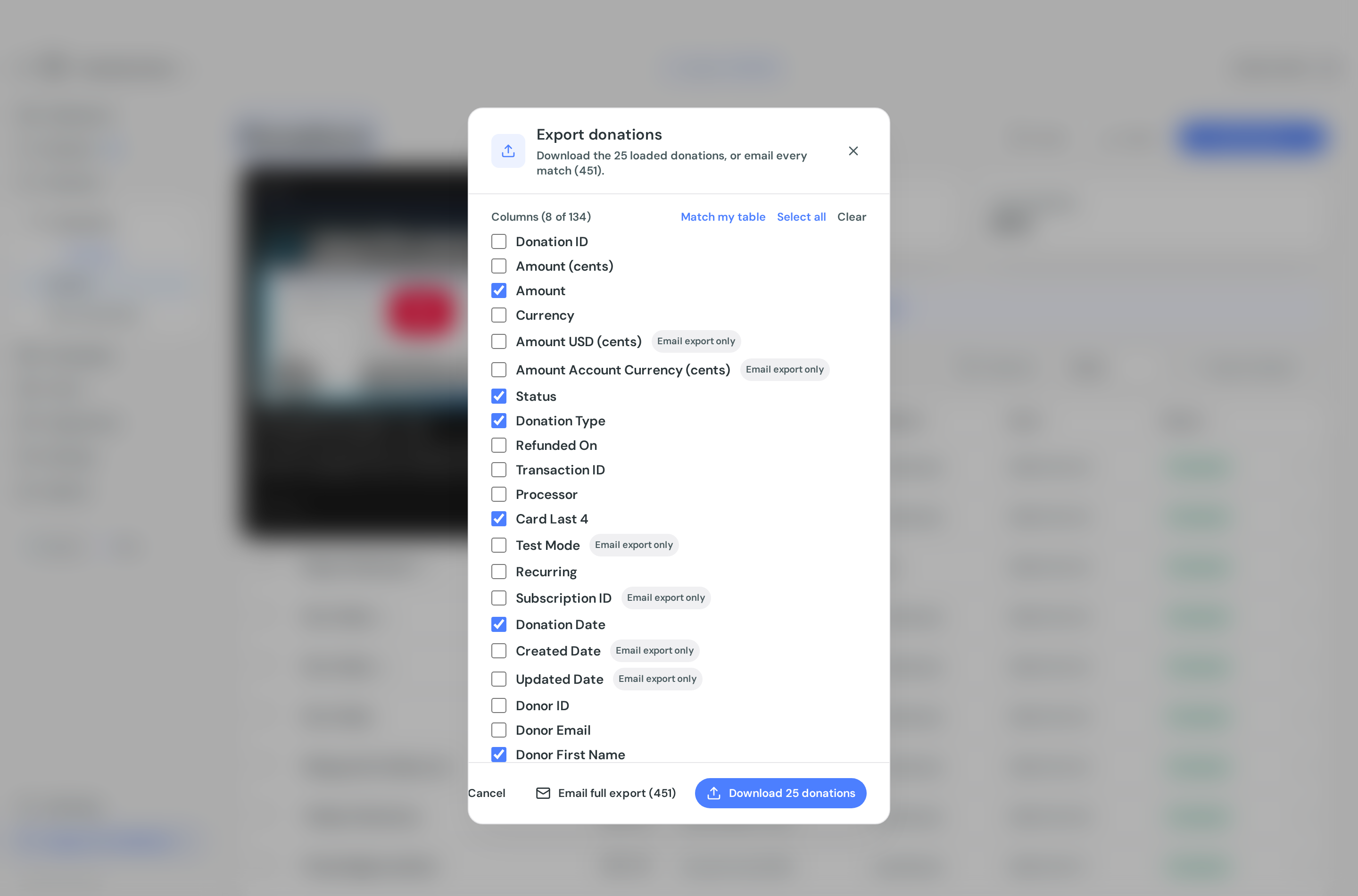
Then select Export. The dialog offers two things, and the difference matters:
Download the loaded rows. The button reads Download 25 donations, or whatever is on screen. This is instant, straight to your browser, and it covers only the rows currently loaded, which is the page you are looking at. Raise Rows per page to 100 first if you want more in one go.
Email full export. The button reads Email full export (1,204), with the real number of matching rows. This runs on the server across every row that matches your filters, not just the page, and arrives by email. You will see Full export queued, check your email shortly.
For a handful of rows, download. For a real report, email it. The download is capped by the page size, so it is easy to think you have exported everything when you have exported 25 rows.
Save the file when the email arrives rather than leaving it in your inbox. The download link it contains is temporary.
Choosing columns
The dialog lists every available column with a tick box, headed Columns (8 of 58).
It opens pre-ticked to match the columns visible in your table, so the export looks like what you are looking at. Three shortcuts sit beside the heading: Match my table resets to that, Select all ticks everything available on that path, and Clear unticks everything.
Why some columns are greyed out
Some columns exist on only one of the two paths, and are badged accordingly:
Email export only. The value is assembled on the server and is not in the browser. On donations this covers the address fields, phone, campaign and fundraiser ids, comments, notes, tracking codes, matching-gift details and timestamps. On campaigns it includes the page content, which is left out of the download because long text gets truncated by spreadsheet apps.
Page download only. The value is computed in the browser and the server export has no equivalent. On donations this is the UTM parameters, the Facebook and Google click ids, and donor-covered fees. On forms it includes the amount raised, the transaction count and the status.
If you tick a column that the path you are using cannot provide, Donately tells you which one and disables the button until you untick it. So if Download goes grey, you have selected an email-only column, and vice versa.
The practical consequence: campaign attribution and UTM data are download-only. To get UTMs for more than one page of donations, raise the page size and download in batches.
Custom field answers
On donations, your custom form fields appear as their own columns. A field gets one column headed with its label and (meta), and if it has preset options it gets a second (meta label) column with the readable choice rather than the stored id.
These are not ticked by default and are not added to the emailed export automatically, so tick them yourself if you need them. See Custom fields.
Exporting a selection
Tick rows in the list and an action bar appears at the bottom with its own Export. That exports exactly what you selected.
This path is download-only. There is no Email full export on a selection, because you have already said which rows you want.
Export one fundraiser's donors
Peer-to-peer campaigns have their own version of this, because the usual reason for wanting it is thank-you notes: each fundraiser gets a list of the people who gave to them, with mailing addresses.
Go to Fundraisers, open the one you want, and select Export on the Recent Donations card. The dialog opens pre-ticked with the columns that job needs: donor name and email, street address, city, state, postal code and country, amount, date and status.
Choose Email full export. The address columns are email-only, so Download is unavailable while they are ticked, and it would only cover the ten gifts shown on the card anyway. Repeat for each fundraiser.
To do the same from the Donations list instead, filter by Campaign first and then by Fundraiser. The Fundraiser picker is deliberately empty until a campaign is chosen, so that it lists that campaign's fundraisers rather than every fundraiser you have ever created.
Things to know
No limits. There is no row cap or size limit on the emailed export, and exporting is not restricted by plan or role.
Sorting is not carried over. Sorting you applied to the table affects the download, since that is the page you are looking at, but the emailed export comes back in the server's own order.
Forms behave slightly differently. The forms download covers your whole filtered view rather than one page. The Email full export button only appears on the All tab, because the Published and Draft tabs are refinements the server cannot reproduce.
Sample data accounts only get the download path.
A different report worth knowing about
If what you actually want is year-end giving totals per donor, there is a purpose-built version. On Contacts, use Tax receipts, then Email me a donor report, which sends a CSV of everyone who gave last year with their contact details and totals. See Send annual tax receipts.