
Change or cancel your recurring donation
Manage your recurring giving at my.donately.com: change the amount, frequency or end date, switch the card or bank account it is charged to, or cancel a plan.
If you give regularly to an organization that uses Donately, you manage that giving yourself at my.donately.com. You can change the amount, how often it runs, when it ends, and the card or bank account it is charged to, or cancel it. You do not need to contact the organization for any of that.
First time here? Activate your dashboard
Your dashboard is not created automatically when you donate. To set it up:
- Go to my.donately.com/activate.
- Enter your email address, the one you used when you donated, and click Send me a code.
- Enter the code from your email, choose a password of at least 8 characters, and finish.
You will land in your dashboard, and from then on you sign in at my.donately.com with that email and password.
If you have activated before, use Sign in instead.
This is a separate login from a Donately account for organizations. If you are asked to connect to Stripe, you are in the wrong place. Email support@donately.com and we will sort it out.
Find your recurring plans
In the sidebar, open Donations → Recurring Plans. The list shows every plan you have, across every organization you give to, with its Amount, Frequency, Next Payment, Organization, Payment method and Status.
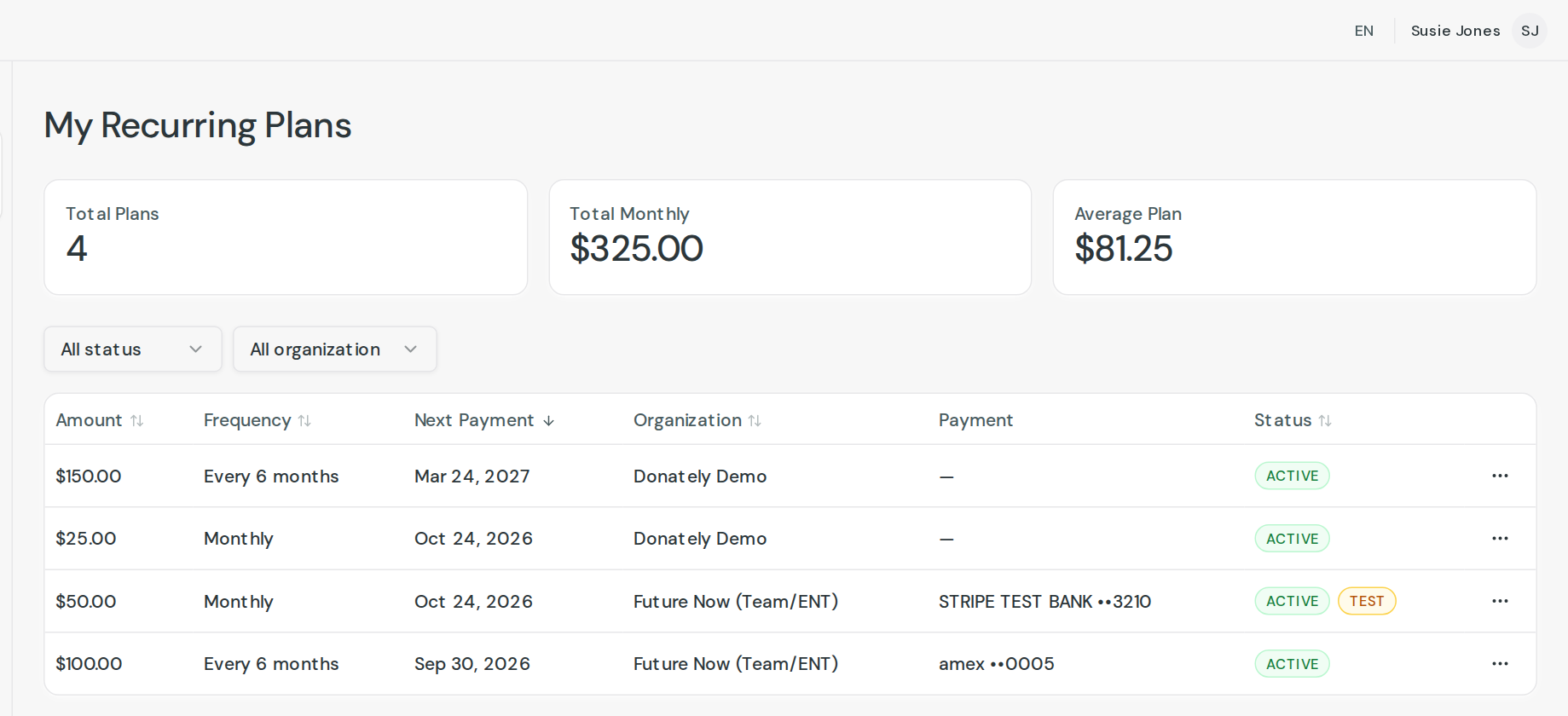
Click a plan to open it. Everything below happens on that page.
Change the amount, frequency or end date
On the Plan card, click Edit.
- Amount: type the new amount.
- Frequency: choose from daily through yearly, including every 2, 3, 4 or 6 months.
- End date: the last day the plan will be charged. Leave it blank for no end date.
Click Save.
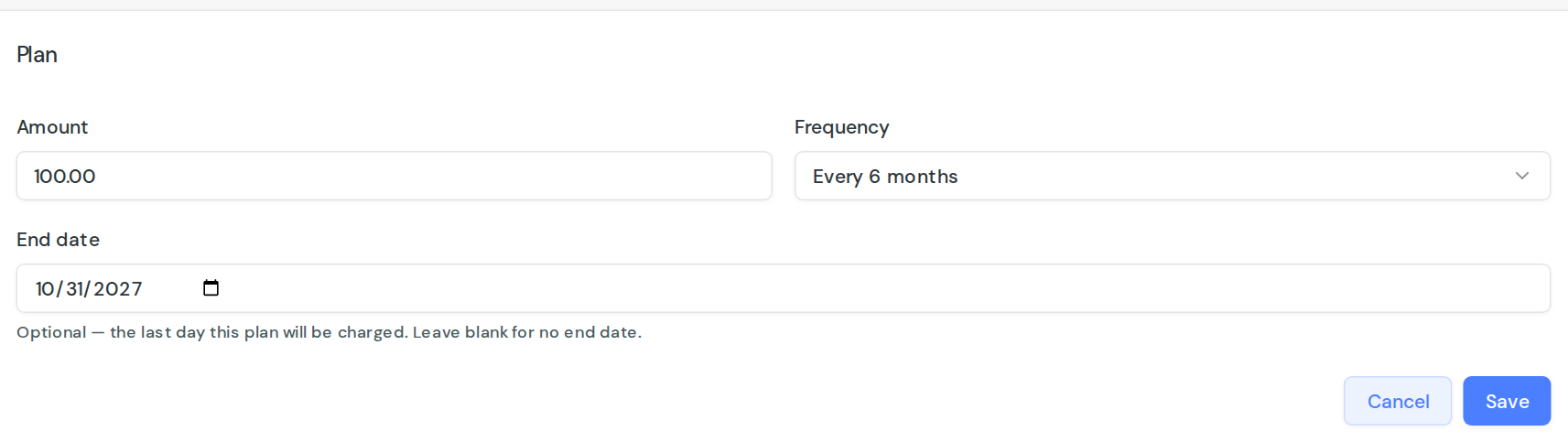
Changing the frequency restarts the schedule, so the next charge is counted from the day you save rather than from the original date. Changing only the amount leaves the existing schedule alone.
The start date and the next payment date are shown for reference and cannot be edited directly. To move the next charge, change the frequency, which restarts the schedule from today.
Change the payment method on a plan
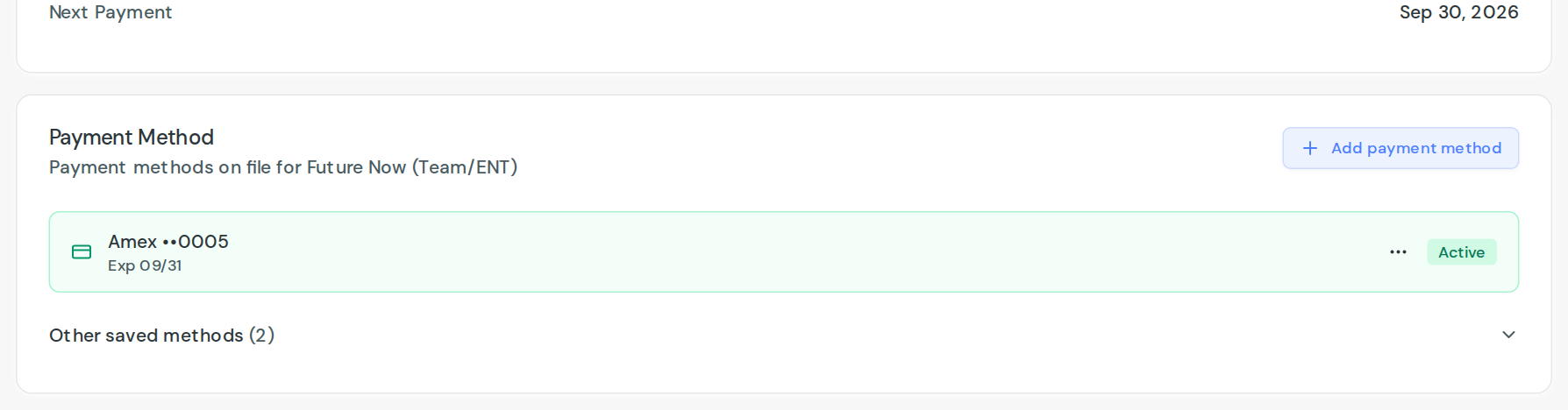
Open the plan and find the Payment Method card. The method the plan is charged to sits at the top with an Active badge, and anything else you have saved with that organization is behind Other saved methods.
Sharing this with a donor? Send them the link as it is, the steps below are written for them. From the admin dashboard you can update a card on a donor's plan yourself, with Update card on file on the plan page. A bank account has to be added by the donor on their own dashboard, because only they can finish the verification step.
Switch to a method you have already saved
Use the three-dot menu beside it and choose Use for this plan.
Add a new card or bank account
- Click Add payment method.
- Choose Card or US bank account at the top of the form.
- Enter the details and click Save.
Anything you add from a plan's own page becomes that plan's payment method straight away, so you do not also need to choose Use for this plan. You will see Payment method added. Your next scheduled gift will use it.
Nothing is charged when you save. The new method is used from the next scheduled payment onwards.
The line above Save that reads This gift charges $25.00 Monthly. That amount will be debited from the account above on that schedule until you change or cancel it is a summary of the plan you already have, not a new charge.
Correct the expiry date on a saved card
Use the three-dot menu beside the card and choose Update. Only the expiry date can be changed on a saved card. If the card number itself has changed, add the new card as above instead.
Two more options live in that menu:
- Make default: use this method for any plan that does not have one of its own.
- Remove: take the method off your file with that organization. You cannot remove the method a running plan is using, so switch the plan to another one first.
If you do not see a Payment Method card, the plan is paid by PayPal or was recorded by the organization directly. Those cannot be changed here, so contact the organization. You can still change the amount, frequency and end date, and you can still cancel.
Give from a bank account, including a credit union
Choose US bank account on the Add payment method form. There are two ways to add one, and which you need depends on your bank.
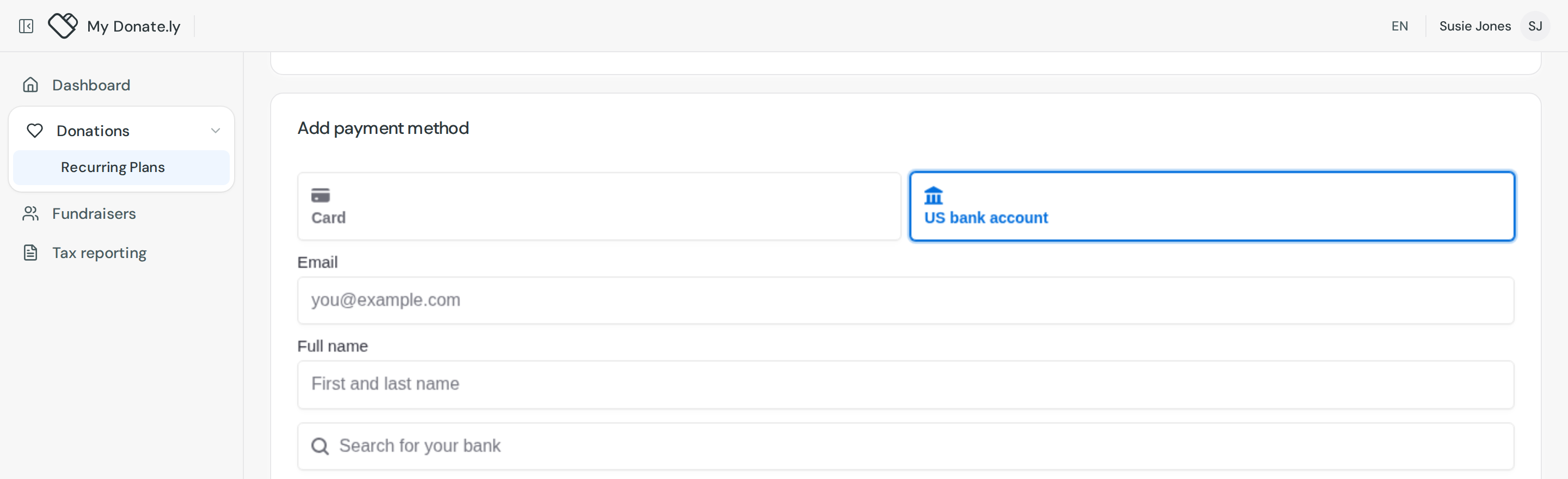
Search for your bank covers the banks that support signing in directly. Find yours, sign in with your online banking details, and the account is connected and ready to use immediately.
Plenty of smaller banks and most credit unions are not on that list. That is normal and it does not mean you cannot give from that account. Below the list, click Enter bank details manually.

Enter the Routing number and Account number from a check or from your bank's app, confirm the account number, and click Submit.
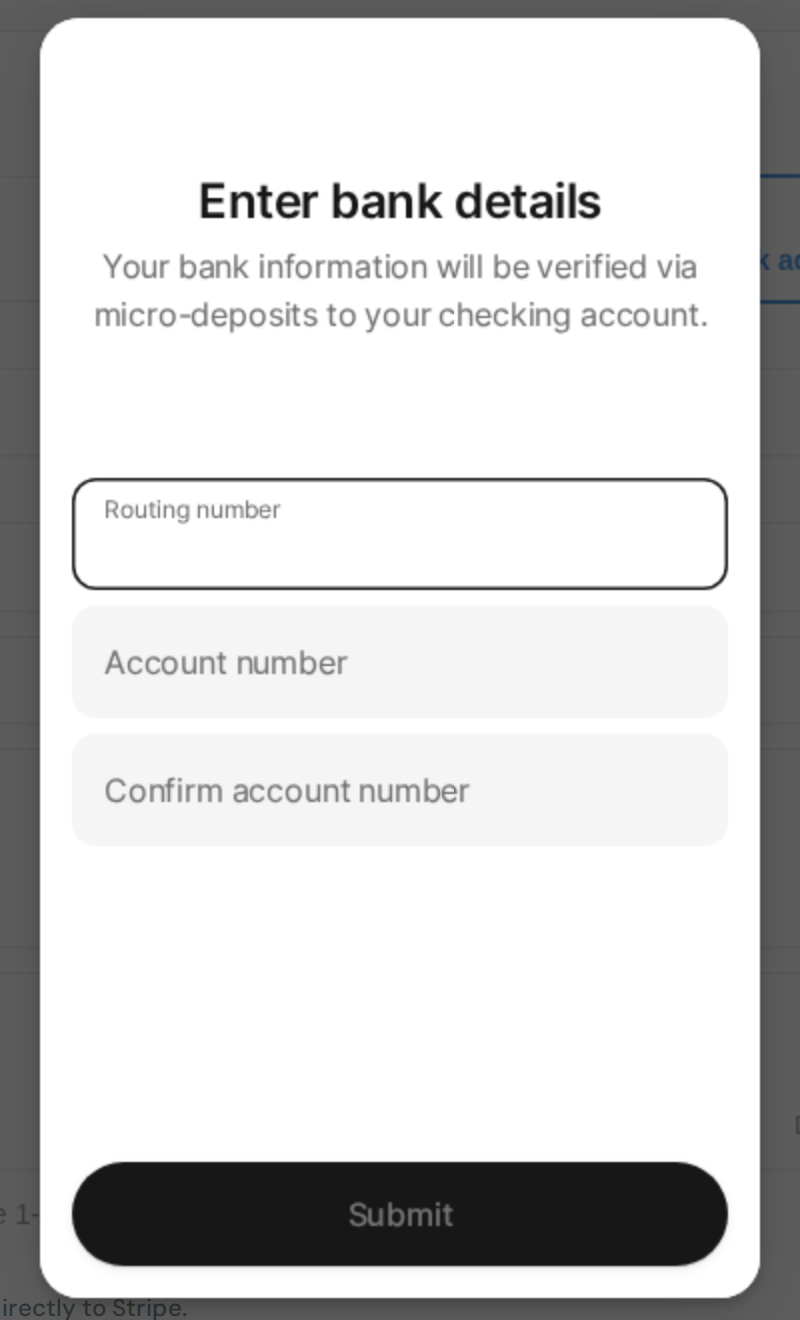
Use a checking account. Micro-deposit verification is not reliable on savings accounts, and some banks block debits on them entirely.
Verifying a bank account you entered by hand
An account added this way has to be verified before it can be charged, which takes 1 to 2 business days. The plan shows Bank verification pending, and two things happen:
- A $0.01 deposit reaches the account. On your statement it carries a 6-character code that starts with
SM. Enter that code to verify the account. - You also get an email with a link to finish the same verification, if that is easier.
While you wait, the plan keeps using your current payment method, so no payment is missed. The new account sits in the Payment Method card marked Pending verification, with a Verify bank button beside it, so you can come back and finish whenever the deposit lands.
Cancel a plan
- Open the plan and click Cancel Plan, at the top right. You can also use the three-dot menu on the list.
- Confirm with Yes, Cancel Plan.
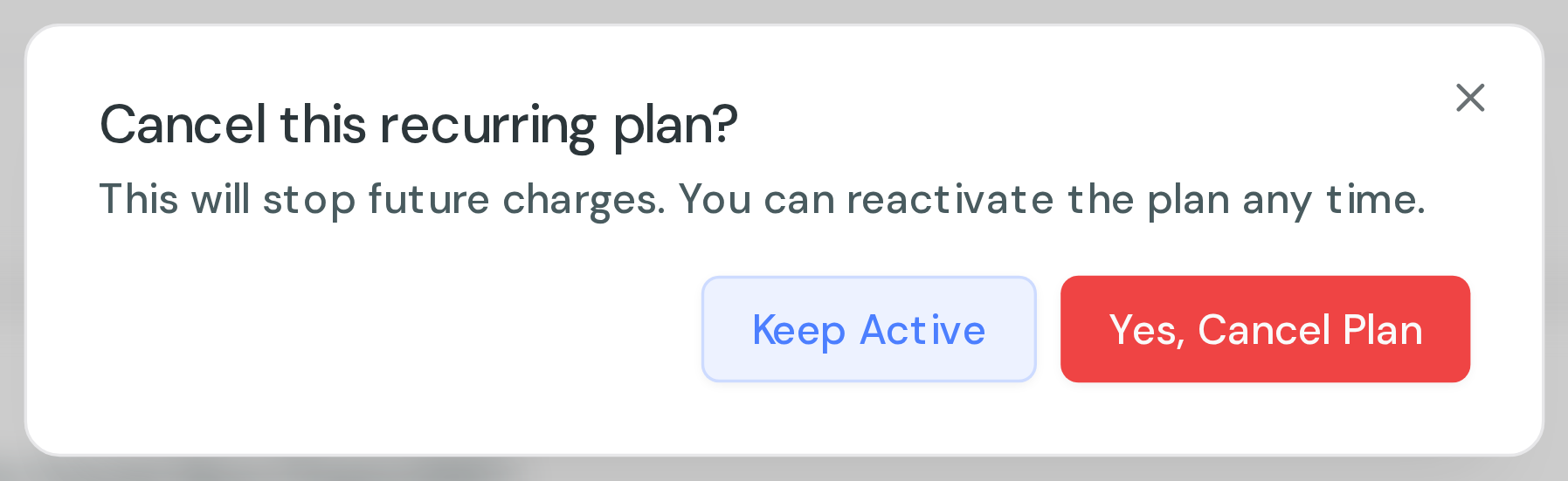
Cancelling takes effect immediately and stops all future charges. Nothing further is taken. Donations already processed are not refunded, so contact the organization if you need a refund.
We do not send a confirmation email when you cancel. The plan's status changes to CANCELED and its next payment shows as a dash, which is your confirmation.
Restart a plan you cancelled
Open the plan and click Reactivate. If the card it used has since expired or been removed, you will be asked to pick a saved card or add a new one, and the plan restarts with that.
What the statuses mean
- ACTIVE: running normally.
- FAILED ONE through FAILED FOUR: a recent charge did not go through, and the number is how many attempts have failed. Updating your payment method is usually the fix.
- SUSPENDED: the plan is on hold and is not being charged.
- CANCELED: stopped, with no future charges. You can reactivate it.
Other things you can change
On the same page:
- Public display: give on behalf of someone, leave a comment, or make future donations anonymous. Changes apply to future payments, not past ones.
- Receipts: turn the email receipt for future donations on or off.
The organization, campaign or fundraiser a plan supports cannot be changed here. Contact the organization if you are giving to the wrong one.